Q 1. What is Magento?
Ans. Magento is a feature-rich eCommerce platform built on open-source technology that provides online merchants with unprecedented flexibility and control over the look, content and functionality of their eCommerce store. Magentos intuitive administration interface features powerful marketing, search engine optimization and catalog-management tools to give merchants the power to create sites that are tailored to their unique business needs. Designed to be completely scalable and backed by Variens support network, Magento offers companies the ultimate eCommerce solution.
Q 2. What is the difference between Mage::getSingletone() andMage::getModel() in Magento
Ans. Mage::getSingletone() always finds for an existing object if not then create that a newobject but Mage::getModel() always creates a new object.
Q 3. Why Magento use EAV database model ?
Ans. In EAV database model, data are stored in different smaller tables rather than storing in asingle table.product name is stored in catalog_product_entity_varchar tableproduct id is stored in catalog_product_entity_int tableproduct price is stored in catalog_product_entity_decimal tableMagento Use EAV database model for easy upgrade and development as this model givesmore flexibility to play with data and attributes.
Q 4. How to upgrade to the latest version using Magento Connect?
Ans. Upgrading Magento to the latest version is a fairly simple task. Copy and Paste this key magento-core/Mage_All_Latest VIA Magento Connect where it states Paste extension key to install:. This will upgrade Magento to the newest version.
Q 5. Explain about the Modules of Magento?
Ans. Magento supports installation of modules through a web-based interface accessible through the administration area of a Magento installation. Modules are hosted on the Magento eCommerce website as a PEAR server. Any community member can upload a module through the website and is made available once confirmed by a member of the Magento team. Modules are installed by entering a module key, available on the module page, into the web based interface.
There are three categories of modules hosted on Magento Connect:
Core Modules
Community Modules
Commercial Modules
Core and Community modules can be installed via the administration area. Commercial module pages provide price information and a link to an external website.
Q 6. What technology used by Magento?
Ans. Magento uses PHP as a web server scripting language and the MySQL Database. The data model is based on the Entity-attribute-value model that stores data objects in tree structures, thus allowing a change to a data structure without changing the database definition.
Q 7. What is MVC structure in Magento?
Ans. The Model-View-Controller (MVC) architecture traces its
origins back to the Smalltalk Programming language and Xerox
Parc. Since then, there have been many systems that describe
their architecture as MVC. Each system is slightly
different, but all have the goal of separating data access,
business logic, and user-interface code from one another.
Q 8. What is benefit of namespace (package) in magento?
Ans. We can have more than one module with same name but they should be placed in different namespaces. All magento core modules are contained in mage namespace.
core/Mage/Catalog
and all custom modules are placed in
local/CustomModule
Q 9. How to include CMS block in template file(.phtml)?
Ans. Access block’s content from .phtml template file by :
echo $this->getLayout()->createBlock(‘cms/block’)->setBlockId(‘static_block_id’)->toHTML();
Q 10. How to add an external javascript/css file to Magento?
Ans.
css/yourstyle.css
or
skin_jsjs/ yourfile.js
skin_csscss/yourstyle. css
Q 11. What are handles in magento (layout)?
Ans. Handles are basically used for controlling the structure of the page like which block will be displayed and where. First level child elements of the node are called layout handles. Every page request can have several unique Handles. The handle is called for every page. handle for products belongs to virtual product type, PRODUCT_TYPE_simple is called for product details page of simple product type and PRODUCT_TYPE_virtual is called for the virtual product detail page and customer_logged_in handle is called only if customer is logged in. The muster_index_index handle is created by combining the frontName (muster), Action Controller (index), and Action Controller Action Method (index) into a single string and this handle will be called only when /zag/index/index url is accessed.
Q 12. What is in magento?
Ans. The routers tag allow us to decide frontname for each module. The tag is defined in config.xml file of module. For Namespace_MyModule frontname is moduleurl so the url will be like :
websiteurl.com/moduleurl/controllername/actionname
standard
Namespace_MyModule
moduleurl
.
Q 13. Which factors affect performance of magento?
Ans.
1. EAV structure of magento database, even for retrieving single entity the query becomes very complex .
2. Magento’s template system involves a lot of recursive rendering
3. Huge XML trees built up for layout configuration, application configuration settings
Q 14. How to improve magento performance?
Ans.
Enabled magento caching
MySQL Query caching
Enable Gzip Compression
Disable any unused modules
Disable the Magento log
Optimise your images
Combine external CSS/JS into one file
Enable Apache KeepAlives: Make sure your Apache configuration has KeepAlives enabled.
Q 15. How to get the Total Price of items currently in the Cart?
helper(‘checkout’)->formatPrice(Mage::getSingleton(‘checkout/cart’)->getQuote()->getGrandTotal()); ?>
Q 16. How to set different themes for logged in users?
if(Mage::getSingleton(‘customer/session’)->isLoggedIn()):
Mage::getDesign()->setPackageName(‘package_name’)->setTheme(‘themename’);
endif;
Q 17. How to create magento custom module?
Ans. Steps to create custom magento module:
Namespace : Zag
Module Name : Mymodule
1. Create directory Mymodule in app/code/local/Zag
2. Create Block, controllers, etc, Module directories. Create controller, block and module file as required.
3. Create module configuration file (app/code/local/Zag/Mymodule/etc/config.xml).
4. Create xml file (app/etc/modules/Zag_ Mymodule.xml)to enable/disable module and tell magento system from which code pool that module will be taken.
Q 18. How to set different themes for each store?
Ans. Go to : System>Designs
Then, add new design change or edit existing. You can select Store and Custom Design.
Q 19. How to make product’s custom attribute searchable in adavance search?
Ans. Go to : Catalog > Attribues > Manage Attribues
Edit the attribute and select “Yes” for Use in Advanced Search.
Q 20. How to fetch 5 bestsellers products programmatically?
Ans.
Mage::getResourceModel(‘reports/product_collection’)
->addOrderedQty()
->addAttributeToSelect(‘*’)
->setPage(1, 5)
->load();
21-Explain Magento’s MVC architecture
First of all, what is MVC?
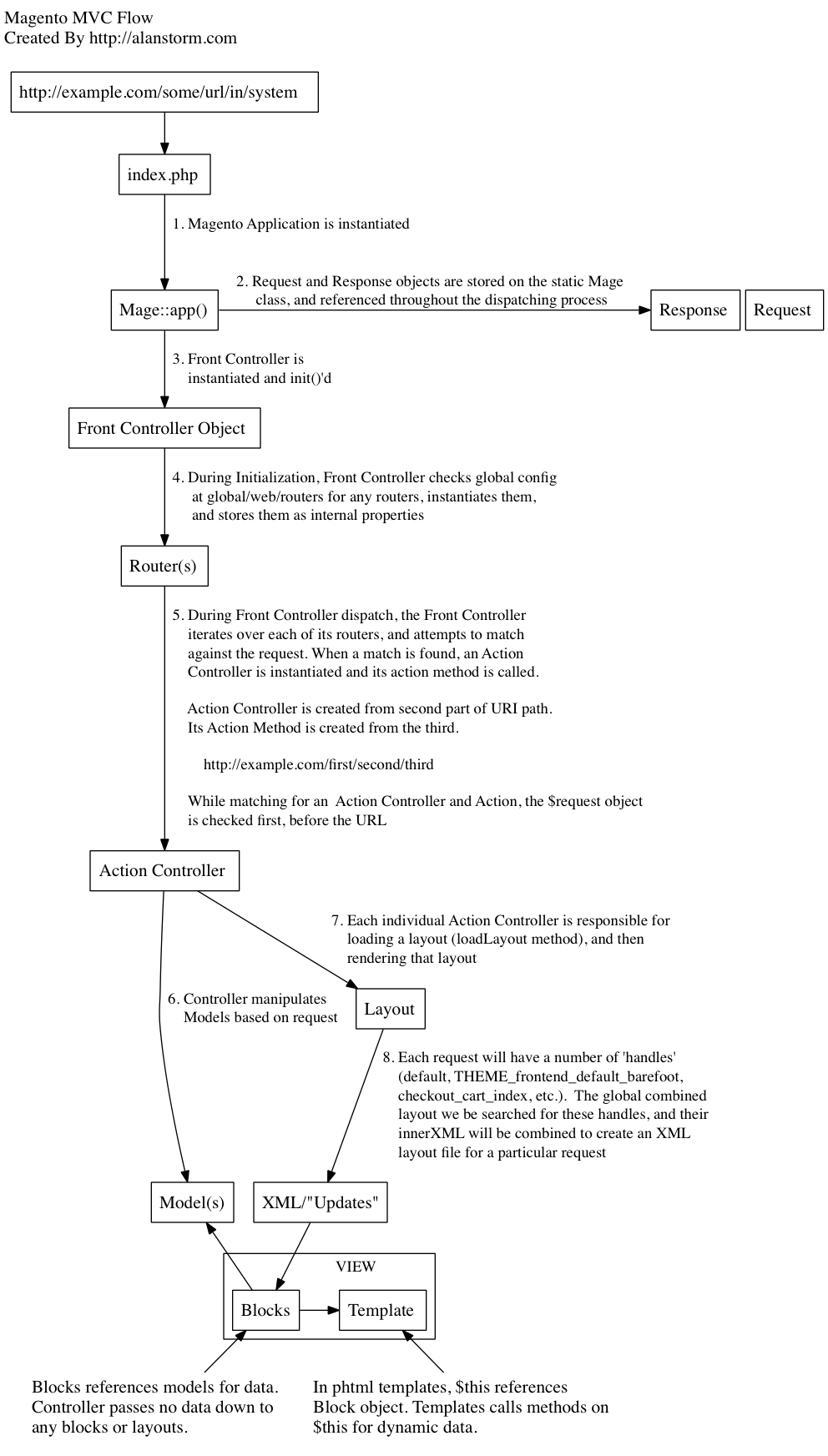
MVC stands for Model-View-Controller. Any application that separates it’s data access, business logicand user interface is called MVC. There can be two types of MVC: convention-based andconfiguration-based. Example, cakePHP is convention-based, i.e. you just need to follow the instructions of the core system to get your module ready in just few lines. Magento is configuration-based, i.e. you need to specify each and every thing to your module’s config file in order to get it work. Magento has Controller (for Routing), Block (for Business Logic), Model (for DB access, sql) and Template file (for Presentation i.e. View).
How Magento’s MVC works:
1. When you enter the URL (something like http://mysite.com/frontname/controller/method/param1/value1/param2/value2), this URL is intercepted by one PHP file called index.php which instantiates Magento application
2. Magento application instantiates Front Controller object
3. Further, front controller instantiates Router objects (specified in module’s config.xml, global tag)
4. Now, Router is responsible to “match” the frontname which is in our URL
5. If “match” is found, it sees controller name and method name in the URL, which is finally called.
6. Now depending on what is written in action name (method name), it is executed. If any models are called in it, the controller method will instantiate that model and call the method in it which is requested.
7. Then the controller action (method) instantiate the Layout object, which calls Block specified for this action (method) name (Each controller action name have block and template file associated with it, which can be found at app/design/frontend or adminhtml/namespace/module/layout/module.xml file, name of layout file (module.xml) can be found in config.xml of that module, in layout updates tag).
8. Template file (.phtml) now calls the corresponding block for any method request. So, if you write $this->methodName in .phtml file, it will check “methodName” in the block file which is associated in module.xml file.
9. Block contains PHP logic. It references Models for any data from DB.
10. If either Block, Template file or Controller need to get/set some data from/to database, they can call Model directly like Mage::getModel(‘modulename/modelname’).
For diagramatic view: click here (courtsey: Alan Storm)
22 =How Magento ORM works?
ORM stands for Object Relational Mapping. It’s a programming technique used to convert different types of data to Objects and vice versa.
In Magento, ORM is shown as Model (based on Zend Framework’s Zend_Db_Adapter), which further breaks down to two types of Models.
- First is the “simple” i.e. Regular Models which is nothing but flat table or our regular table structure.
- Second Model is EAV (Entity Attribute Value), which is quite complicated and expensive to query.
All Magento Models interacting with database are inherited from Mage_Core_Model_Abstract class, which is further inherited from Varien_Object.
Difference between two Models is, Simple Model is inherited fromMage_Core_Model_Resource_Db_Abstract class,
while EAV is inherited from Mage_Eav_Model_Entity_Abstract.
For those who don’t know what EAV is, please read my 3rd answer below.
So, to end up this question,
when you want to get some data in Magento, you call it like this:
Mage::getModel('module/model')->load(1);
where 1 is the primary key id for some Regular/Simple table, while in EAV so many tables are joined to fetch just single row of data.
23. What is EAV in Magento?
EAV, stands for Entity Attribute Value, is a technique which allows you to add unlimited columns to your table virtually. Means, the fields which is represented in “column” way in a regular table, is represented in a “row” (records) way in EAV. In EAV, you have one table which holds all the “attribute” (table field names) data, and other tables which hold the “entity” (id or primary id) and value (value for that id) against each attribute.
In Magento, there is one table to hold attribute values called eav_attribute and 5-6 tables which holds entity and data in fully normalized form,
- eav_entity, eav_entity_int (for holding Integer values),
- eav_entity_varchar (for holding Varchar values),
- eav_entity_datetime (for holding Datetime values),
- eav_entity_decimal (for holding Decimal/float values),
- eav_entity_text (for holding text (mysql Text type) values).
EAV is expensive and should only be used when you are not sure about number of fields in a table which can vary in future. To just get one single record, Magento joins 4-5 tables to get data in EAV. But this doesn’t mean that EAV only has drawbacks. The main advantage of EAV is when you may want to add table field in future, when there are thousands or millions of records already present in your table. In regular table, if you add table field with these amount of data, it will screw up your table, as for each empty row also some bytes will be allocated as per data type you select. While in EAV, adding the table column will not affect the previously saved records (also the extra space will not get allocated!) and all the new records will seamlessly have data in these columns without any problem.
24. Difference between Mage::getSingleton() and Mage::getModel()
The difference between Mage:getSingleton() and Mage::getModel() is that the former one does not create an object if the object for same class is already created, while the later creates new objects every time for the class when it’s called.
Mage::getSingleton() uses the “singleton design pattern” of PHP. If the object is not created, it will create it.
Mage::getSingleton() is mostly used when you want to create an object once, modify it and later fetch from it. Popular example is session, you first create a session object, and then add/remove values from session across different pages, so that it retains your values (e.g. cart values, logged in customer details, etc.) and doesn’t create new session object losing your last changes.
Mage::getModel() is used when you want to have the fresh data from the database. Example is when you want to show records from database.